


IPinfo Data, Where Developers Already Work: Introducing the IPinfo MCP Server
Get Unlimited Access to IPinfo Lite
Start using accurate IP data for cybersecurity, compliance, and personalization—no limits, no cost.
Sign up for freeDevelopers are building more of their daily work inside AI tools: assistants that triage security alerts, agents that review transactions, copilots that live in the editor. Traditionally, when one of those workflows needs to know something about an IP address, the solution has been more tedious. It’s necessitated stopping to write a custom integration: wire up the REST call, manage the token, parse the response, and hand it back to the model. That glue code is friction, and friction is where adoption stalls.
IPinfo’s Model Context Protocol (MCP) removes that friction. MCP has quickly become the standard way AI tools connect to external data sources. The same way an assistant might reach a database or a file system, it can now reach a data provider directly.
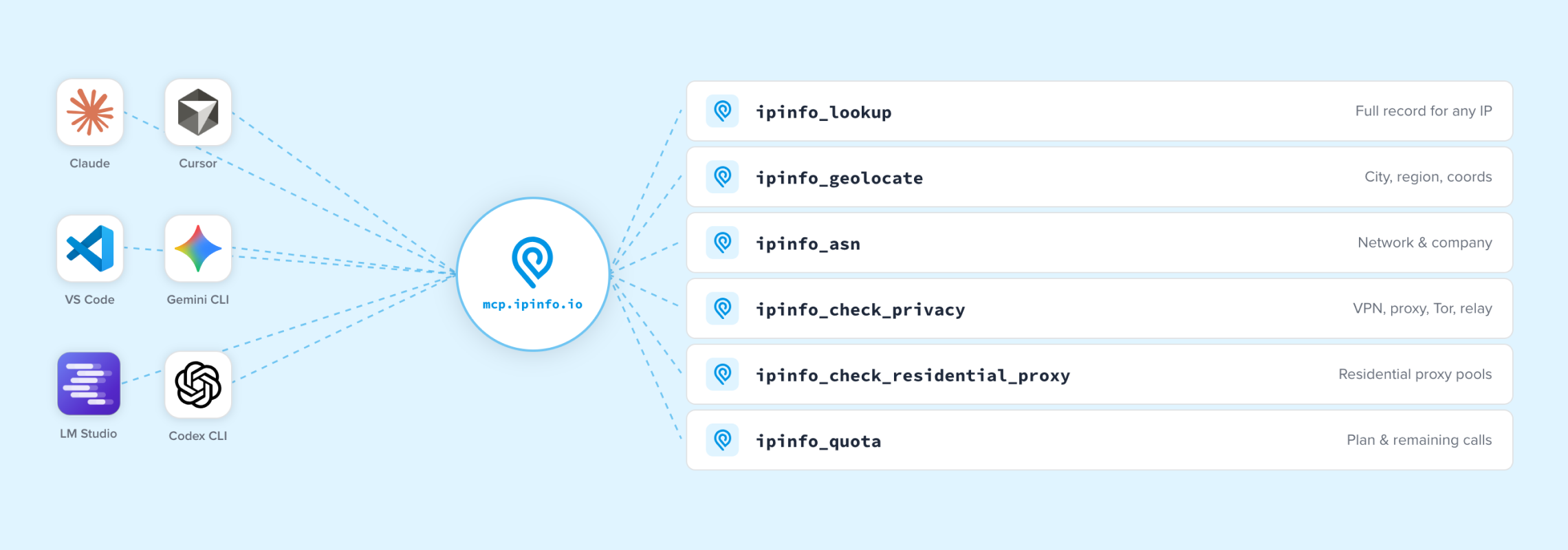
As of today, the official IPinfo MCP Server is live. Point any MCP-compatible client (Claude Desktop, VS Code, Cursor, LM Studio, and others) at our server, authenticate with the IPinfo token you already have, and your AI workflow can query IPinfo data directly. No SDK, no tool-calling boilerplate, no separate integration to maintain.
What the IPinfo MCP Server Is
The IPinfo MCP Server exposes IPinfo’s IP intelligence (geolocation, ASN and network ownership, privacy detection, residential proxy signals, and account quota) through a single MCP endpoint. Under the hood, it’s the same data and the same API you already know.
MCP is simply a new interface to it: same token, same datasets, conversational access. It removes the integration layer between your AI tool and the IPinfo data you’d otherwise reach through the REST API, so the model can just ask.
Setup Takes About a Minute
Go to mcp.ipinfo.io, paste in your IPinfo token, and the page generates ready-to-copy configuration for every supported client, with one-click install buttons for Claude Desktop, VS Code, Cursor, and LM Studio. Your token authenticates each request and determines which tools and fields are available based on your plan, so there’s no separate account to create. Repeat lookups within a session are served from an in-memory cache, so they don’t burn extra quota.
It’s free to start. Any IPinfo token works, including a free IPinfo Lite token. Paid tiers unlock the fuller signal set: city-level geolocation, named privacy services, residential proxy detection, and more.
The Tools Your Assistant Can Call
The server ships with a focused set of tools:
- ipinfo_lookup: a full IP profile covering geolocation, network, and metadata (detailed mode adds city-level geo and privacy flags)
- ipinfo_geolocate: location data, from country and continent up to city, coordinates, and timezone
- ipinfo_asn: autonomous system and network ownership (ASN, organization, domain, and network type)
- ipinfo_check_privacy: VPN, proxy, relay, and Tor checks, plus hosting, mobile, and anycast flags
- ipinfo_check_residential_proxy: residential proxy detection with provider name, last-seen date, and frequency signals
- ipinfo_quota: current API usage and remaining quota
A developer can ask their assistant, “What can you tell me about 1.2.3.4?” The model then calls ipinfo_lookup and returns the enriched answer inline. No context switch, no second tab.
A Worked Example: Turning Ad Logs Into B2B Strategy
The real power shows up when an AI tool can stitch IPinfo together with another live source. Take a marketing example.
Say your team runs programmatic campaigns through a demand-side platform (DSP), and both the DSP and IPinfo are connected to your assistant over MCP. Performance analysis becomes a conversation:
- Discovery. “Pull the top 50 IPs by click volume from yesterday’s ‘Q1 Enterprise’ campaign.” The assistant queries the DSP and gets a list of IPs with their performance metrics.
- Enrichment. “Now cross-reference those IPs with IPinfo to see which companies they belong to.” The assistant passes the list to IPinfo, which returns company, network type, and location context, and surfaces that 30% of clicks came from one corporation that produced zero conversions.
- Strategy. “Should we adjust our bidding?” Grounded in the joined data, the assistant can reason through a decision: those IPs are hitting the pricing page but not converting, so shift budget from the awareness creative to a direct-demo retargeting play for that range.
What used to be a CSV export and an afternoon of VLOOKUPs becomes a few sentences of conversation. And because IPinfo can flag data-center and VPN traffic, the same setup can separate real corporate networks from noise before a dollar of budget moves.
Use cases extend well beyond marketing: a security assistant enriching an alert, a fraud-review agent checking an IP mid-decision, an agentic pipeline adding network context at inference time. In each case, IPinfo is one natural-language step away.
Data Where Developers Already Work
IPinfo measures the internet through ProbeNet, our internet measurement platform (actively measuring 600M+ IPs a day, with coverage across the full allocated IPv4 and IPv6 space). Our methodology is published and peer-reviewed through our Research Program and partnerships with groups like CAIDA, RIPE NCC, and M-Lab. The whole point of measuring at that scale is to make trustworthy data accessible wherever you need it: the API, database downloads, Snowflake, Splunk, Google Cloud, and now AI-native tools via MCP.
Shipping an official MCP server puts IPinfo among the first IP intelligence providers to meet developers in the AI tools they’re already using.
Get Started
The IPinfo MCP server delivers accurate, validated data in a format built for today’s users:
- Same data fields. MCP isn’t a new product or a separate plan. It uses your existing token and the same rate limits as the REST API.
- Built for conversational and agent workflows. For high-volume batch enrichment (lookups across hundreds of thousands of IPs), the REST API and database downloads remain the right tools. MCP is the interface for interactive, AI-native work.
- It returns IPinfo’s signals; you build the logic. The server hands your AI tool the same factual data the API returns. The decisions (risk scores, block or allow, bidding) stay in your hands.
The IPinfo MCP Server is live now. Head to mcp.ipinfo.io, paste your token, and install it in your client of choice, or read the full setup, tool reference, and client guides in the docs. If you don’t have a token yet, a free IPinfo Lite token is enough to start querying.
Read the MCP Server docs →
Set it up at mcp.ipinfo.io →
Step-by-step client guides are on the community: Claude Desktop and VS Code.
Share this article


About the author

As the product marketing manager, Fernanda helps customers better understand how IPinfo products can serve their needs.