


The Next Level of Geo Data: Introducing IPinfo Places
Get Unlimited Access to IPinfo Lite
Start using accurate IP data for cybersecurity, compliance, and personalization—no limits, no cost.
Sign up for freeIPinfo has always worked toward the same two goals: make IP data more accurate, and make it easy to actually use. Accuracy comes from measuring the internet ourselves rather than reselling borrowed feeds. Usability comes from meeting you where you already work, whether that's a single API call, a batch job, a file in your own warehouse, or an integration with the tools you already run.
Today that means going a level deeper. IPinfo Places is here. It matches IPs observed on public WiFi networks to the actual venue behind them, with building-level precision.
When a device connects to a venue's public WiFi — an airport terminal, a hotel lobby, a stadium — that network itself becomes the signal. Places is an added level of our geolocation data, built into our products and delivered the way you already consume IP data: in your API responses, through the integrations you already run, or as a file in your own infrastructure.
Here's what it does, why it opens up a whole new layer of context, and how to start using it.
Beyond Geolocation Coordinates
Every team that works with IP data ends up climbing the same ladder.
You start with country. It's enough to route a user to the right storefront or block a sanctioned region. Then you need region and city, because "United States" doesn't help you localize a checkout flow or triage an alert.
Then you reach for coordinates, and the ladder stops.
Latitude and longitude look like the next step up. They aren't. IP geolocation resolves an address to an area, and the coordinates describe that area rather than a street address. They are the same locality-level answer rendered in a different format.
Four decimal places make 47.60621, -122.33207 look like a specific destination. It isn't one. It's a point that stands in for a whole area, and it tells you nothing about that IP that "Seattle" didn't already tell you.
So the ladder is shorter than it appears. Country, region, city, and then a coordinate pair that restates the city. If you need to know what is actually at that location, none of those rungs reach it.
From Location to Venue Context
Places resolves an IP address to the specific place it's on. Rather than somewhere in downtown Seattle, Climate Pledge Arena. Rather than a point near Stanwell, London Heathrow Airport. Rather than an IP in New York City, the New York Public Library's Stavros Niarchos Foundation branch.
That's a substantial jump in precision, from a locality centroid to a single address. It also gives you something coordinates never could, which is a name and a type for what's standing there.
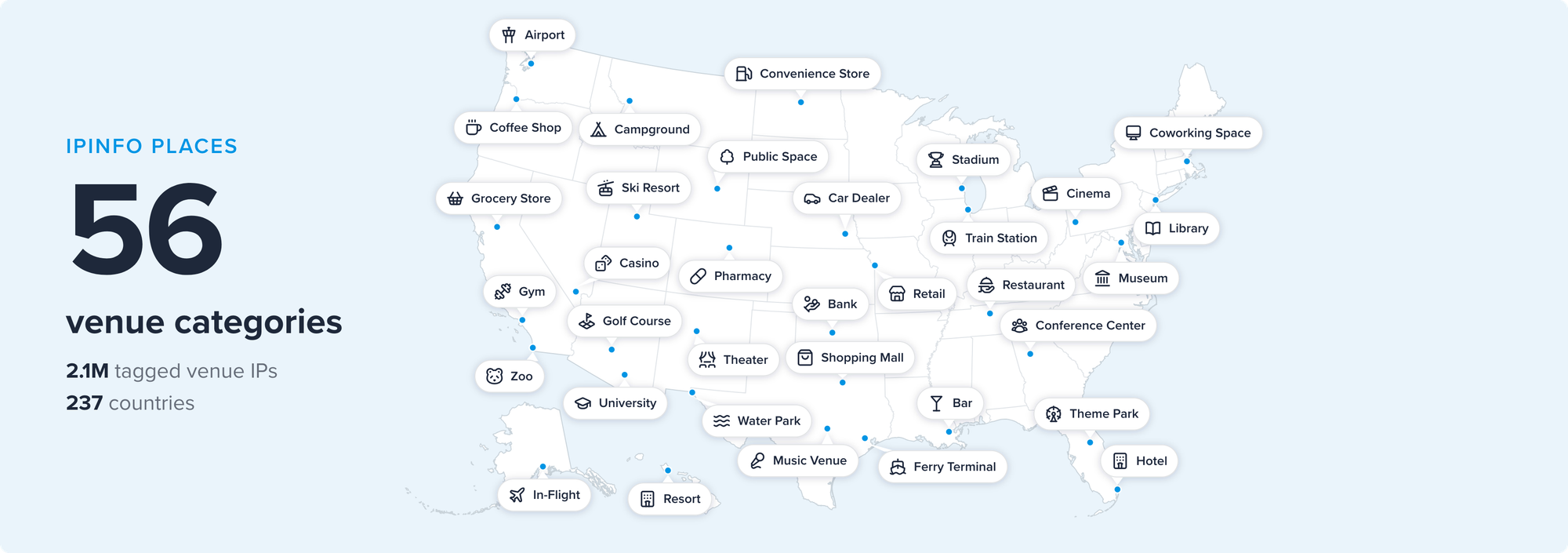
For an IP observed on a public Wi-Fi network, Places can tell you:
name: the venue or place namecategory: a standardized tag from a taxonomy of more than 50 venue types, grouped into families like travel & lodging, dining & nightlife, shopping, and attractions & recreationssid: the Wi-Fi network name observed at the venuelatitude/longitude: exact coordinates for the matched place
You get the most precise answer we can provide, which isn't always all four fields. Category is always there. The rest depend on what the network turns out to be, and when we can't place something exactly, we leave the field out rather than fill it with a guess.
Building-level geolocation is a useful shorthand for this capability, but sometimes Places is more granular than a building. One address can hold several separate venues, and each is tagged on its own terms. Heathrow is a place, and so is the champagne bar in Terminal 5. A store inside a shopping mall is its own venue, not "the mall."
Sometimes there's no building at all. public_space is Wi-Fi in parks, plazas, and other open areas. in_transit is trains, buses, and ferries. in_flight is aircraft. In that case, there's nothing stationary to name and no coordinate that stays true for more than a minute, so name, latitude, and longitude are left out. Knowing an SSID belongs to in-flight Wi-Fi is the useful part.
So the field isn't really the building. It's the network, and the specific setting that network serves. is_place tells you an IP is in the Places dataset, while the accompanying fields show the depth of place context available.
Note that the coordinates Places returns and the coordinates IP geolocation returns for the same IP can differ, and that's by design. Places describes the venue. Geolocation describes the area the network resolves to. Only one of them is a specific point on the ground. Together, they provide complementary views of the same IP address.
Two Layers of Location
Here's what that looks like on a real address. 4.4.193.202 is allocated to the backbone provider Level 3 (AS3356), and the geolocation resolves to Chicago:
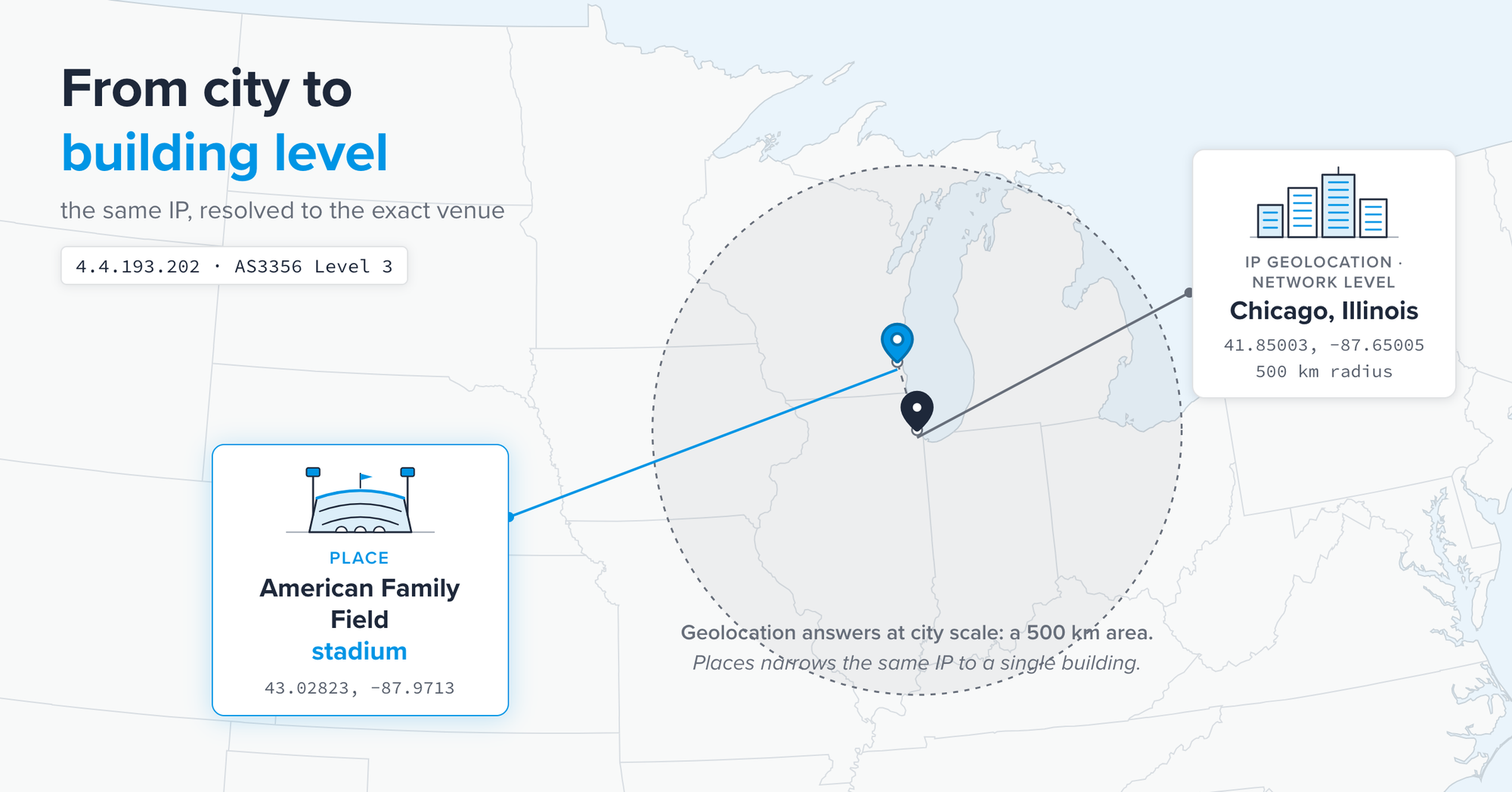
The two coordinate pairs are 134 kilometers apart, in different states. The venue is the Milwaukee Brewers' ballpark. The network answer is Chicago at a 500km accuracy radius. That difference reflects the distinct context each dataset captures.
Chicago is genuinely where this traffic sits within the broader network. Places draws on observations of the public Wi-Fi network to associate the IP with the specific venue it serves.
This is the next rung on the geolocation ladder. Geolocation puts the network on the map. Places puts the venue on the map.
Places Use Cases
Place context becomes especially useful when the same network behavior can mean very different things depending on where it originates. For example:
Shared IPs visibility. Two hundred devices behind one IP address is a red flag in most fraud models. Two hundred devices behind an airport terminal's guest Wi-Fi is a Tuesday. Venue context turns an anomaly into an explanation, which cuts false positives and speeds up analyst triage.
Public networks vs private. For security teams, it matters a great deal whether an IP is a shared public network. A library, a hotel lobby, and an airport terminal each explains behavior that would otherwise read as anomalous. Places names those networks directly instead of leaving you to infer it from ASN type and hope for the best.
Location targeting. Adtech and audience analytics teams that lost GPS and cookie signals can attribute traffic to place categories (airports, hotels, stadiums, coffee shops) from the IP alone. The result is contextual targeting and footfall-adjacent analytics, without the device permission dance.
Enrichment models. Lending risk, identity resolution, and account-takeover scoring all benefit from a signal that indicates a session originated on a coffee shop's guest network rather than a vague point in a city.
Across each of these use cases, Places adds context to an IP address that was already part of the workflow. The underlying traffic stays the same. The additional information makes the environment surrounding that traffic easier to understand.
Discover What's Next for Location Targeting in AdTech
Explore how venue-level targeting and IP intelligence are creating new opportunities for advertisers.

Methodology: Observed, Then Matched
A venue tag has to get two separate factors right. The network has to be observed, and it has to be tied to the right building.
The observation comes from device data: the Wi-Fi networks devices actually connect to, and the SSID each network broadcasts. That's a direct signal about the network itself, not an assumption drawn from the address block it happens to sit in.
The tying in to the right building comes from matching those observations against public venue records, including OpenStreetMap, so the name and category you get back correspond to an actual place rather than a label we invented. The strongest matches carry their own evidence, where the venue operates the network's ASN, the SSID names the venue, or the observed location falls inside the building's footprint.
What matters operationally is that both halves refresh. A tag reflects a network that was observed on a schedule, and it gets retired when that network changes. It tracks the venue it describes now rather than the venue it described eighteen months ago. It’s the same principle that guides IPinfo’s broader approach to internet data. The strongest understanding comes from combining multiple signals and continuously checking them against observed internet behavior.
The dataset currently covers roughly 2.2 million tagged venue IPs across 237 countries, and it grows as new observations land.
Built Around Networks and Places
Places describes venue networks. Its output is about the Wi-Fi and infrastructure at a hotel, an airport, a stadium, etc. It contains no personal data and no PII.
The underlying observations are aggregated at the network level. The resulting data describes an IP address and a building rather than any person. You learn what kind of place an IP belongs to, not who is behind it.
The result is place context designed to deepen understanding of internet activity while keeping the focus on networks, infrastructure, and the environments they serve.
What You Get With Each Product
Places is available alongside the IP intelligence already included in Core, Plus, and Max, with the depth of place context increasing by product level. The data comes back in the same lookup, making it easy to incorporate into existing workflows.
All three work in the batch endpoint alongside geolocation, ASN, privacy detection, and everything else in your plan. Beyond the standard response, additional fields (including brand, building dimensions, polygon boundaries, BSSIDs, and last-seen date) are available for select use cases. If your work needs any of those, talk to our team.
Turn It On (Free)
If you already use Core, Plus, or Max, Places is yours at no additional cost, and switching it on takes one click.
Log in to your dashboard and go to the API page. There you’ll see the Places toggle (the link below isn't an immediate opt-in). Once it's on, the new attributes appear in the calls you're already making. No new endpoint, no second request, no migration.
If you're not using one of those products yet, Places comes included, so choose a product to get it. If you want the full dataset as a file to run inside your own infrastructure, that's scoped separately, so talk to our team and we'll work out the coverage and delivery you need.
And if you'd rather see what's in it first, explore the full category breakdown and country coverage.
Country told you where in the world. City told you where in the country. Coordinates told you the city again in different formatting.
Places takes you to the building, and tells you what's there.
Share this article


About the authors

As the product marketing manager, Fernanda helps customers better understand how IPinfo products can serve their needs.

As a Data Engineer, Matt translates internet data into structured intelligence. He's previously held roles at World Data Lab and Sust Global and did a postdoc at Harvard, applying data to topics like climate, economic development, and human behavior.