


Get Unlimited Access to IPinfo Lite
Start using accurate IP data for cybersecurity, compliance, and personalization—no limits, no cost.
Sign up for freeDatacenter proxies are generally the easiest anonymizer to detect.
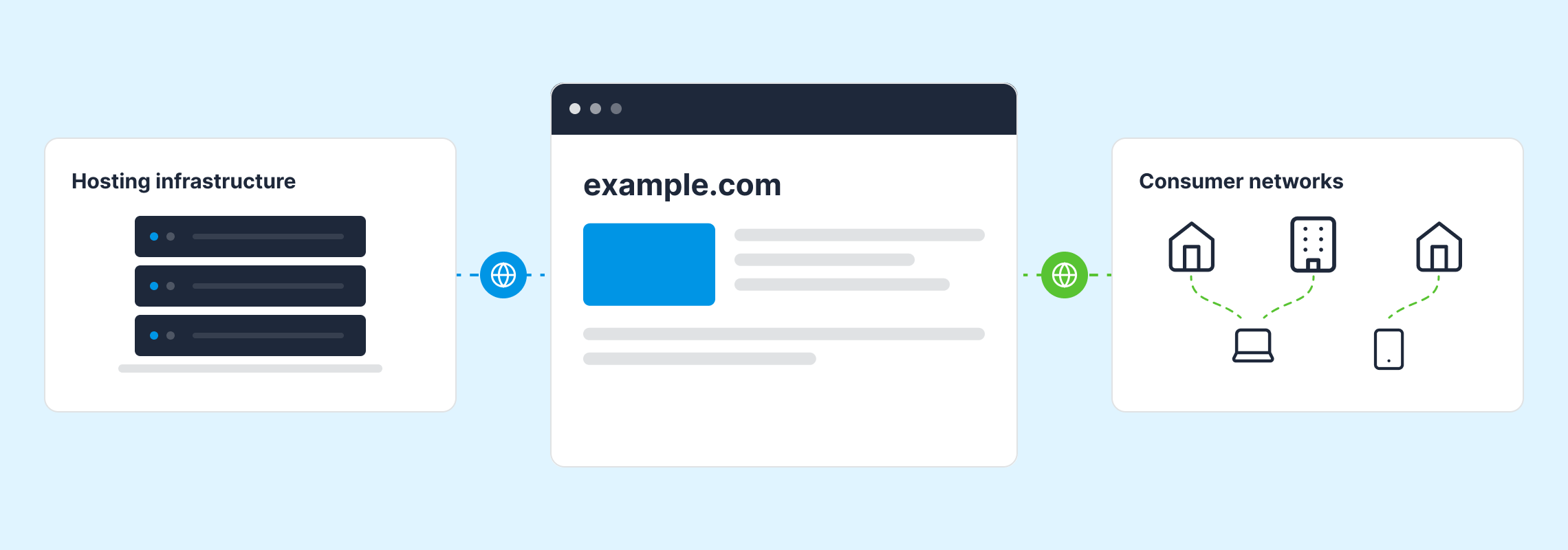
Unlike residential proxies, their IP addresses trace back to hosting providers and cloud operators, networks announced by Autonomous Systems (ASs) that are publicly identifiable as commercial cloud infrastructure rather than consumer ISPs.
That visibility is also why datacenter proxies have a short shelf life for anyone trying to stay hidden. As VPN and hosting detection has become reliable, abuse has moved to residential proxies (networks that route traffic through addresses assigned to real end users, carrying none of the hosting fingerprints that make datacenter traffic classifiable). Understanding datacenter detection is the first half of the problem; knowing what it can't catch is the second.
While results vary depending on the target environment and detection system, this illustrates why attackers who are blocked using datacenter proxies often switch to residential networks when they need to avoid detection.
What is a Datacenter Proxy (and Why it's Easy to Spot)
Datacenter proxy IP addresses aren't assigned to residential customers. They're provisioned by cloud providers and commercial hosting companies to support servers, applications, and other online services, and can also be used to route proxy traffic.
That commercial ownership is one of the main reasons datacenter proxies are easier to identify.
Hosting providers organize their networks into publicly identifiable ASNs and allocate IPs from known address ranges, creating infrastructure patterns that are much easier to recognize than those found in residential networks.
Together, those characteristics provide the foundation for datacenter proxy detection.
The Signals That Expose a Datacenter Proxy
No single attribute can confirm that an IP is being used as a datacenter proxy.
Instead, detection combines multiple network and behavioral signals to distinguish commercially hosted traffic from residential traffic. These signals come from two different places, and it's worth separating them before you build anything.
- Group 1: Network ownership, hosting classification, reverse DNS, and address-range history all describe the IP itself. When you look these up via an IP intelligence API or a local database, they're the same for every request from that address.
- Group 2: Device and TLS fingerprints, browser timezone and language settings, and request behavior over time all describe the client making the request. These come from the connection itself rather than from an IP lookup, so they're available wherever your traffic terminates, whether that's your own application or the service sitting in front of it.
Datacenter proxy detection works best when both groups are in play: the lookup tells you the traffic came from commercial infrastructure, and your own telemetry tells you whether that's plausible for the user claiming to be behind it. The strongest checks often combine the two. A browser timezone that doesn't match the IP's location is only a signal because you have both halves.
Here are some of the strongest indicators defenders rely on.
ASN and hosting classification (lookup)
One of the first questions defenders ask is who owns the network an IP belongs to.
Nearly every IP address that appears in live internet traffic is announced in BGP by an autonomous system identified by an ASN. When an IP is announced by the ASN of a well-known cloud or hosting provider, such as AWS, Google Cloud, or OVHcloud, it's far more likely to originate from commercial networks than a residential ISP.
Although ASN ownership alone isn't enough to confirm that an IP is being used as a datacenter proxy, it's the strongest place to start. Good quality IP intelligence data exposes this as an explicit classification rather than something you infer from the AS name. IPinfo returns an as.type value of hosting, isp, education, government, or business. A hosting classification tells you the network belongs to a cloud or hosting operator; an isp classification on the same lookup is what distinguishes a datacenter address from a residential one.
That's a more precise signal than an infrastructure boolean, and it's why ASN classification is usually the first thing a detection system looks at.
Reverse DNS and IP-range reputation (lookup)
Once the network owner is known, the next question is what that network looks like.
Reverse DNS (rDNS) records can provide additional context about the environment an IP belongs to. Many hosting providers configure rDNS entries that reference cloud platforms, virtual machines, or datacenter services, making it easier to identify commercial hosting networks during an IP lookup.
But rDNS is a relatively weak signal on its own. PTR records are configured by whoever controls the address block, and they may be absent, generic, or otherwise inconclusive. Even a hostname that appears meaningful should ideally forward-confirm to the same IP before it carries much weight. For that reason, rDNS works best as corroborating evidence for the ASN signal rather than a substitute for it.
IP ranges add another layer of context.
Many cloud and hosting providers publish the address ranges they operate, which makes those ranges a useful starting point. They're a moving target, though. Space gets transferred and resold, reassigned between regions and services, and brought into use faster than static lists track it. Range data is most useful when it's continuously refreshed and paired with what the network is currently observed doing, rather than treated as a fixed inventory.
Behavioral and fingerprint mismatch (your own telemetry)
Even when the network appears legitimate, it's worth asking whether the observed behavior matches it.
Detection becomes much stronger when the characteristics of an IP are compared with the behavior and device presenting it. For example, a request originating from a commercial hosting network but appearing to come from a typical consumer browser may warrant closer inspection.
Other inconsistencies can provide additional context.
Language and timezone settings that don't align with the IP's location, unusual TCP/IP fingerprints, or combinations of browser and network characteristics that don't normally occur together can all indicate that traffic is being routed through a datacenter proxy. Rather than relying on any one indicator, modern detection combines these signals with network intelligence to build a more reliable assessment.
When Hosting Traffic Isn't Proxy Traffic
Identifying an IP as part of a hosting network still doesn't confirm that it's being used as a proxy. Plenty of legitimate internet traffic originates from commercial infrastructure, including server-to-server API calls, corporate traffic routed through cloud networks, CDN and WAF edge nodes, monitoring services, search engine and AI crawlers, and mobile app backends making requests on a user's behalf.
That's why hosting classification and anonymizer detection need to be treated as separate signals. A hosting flag tells you about the network an IP belongs to. Evidence that the address is operating as a proxy or VPN exit tells you something different about how that infrastructure is being used.
Keeping those conclusions separate also makes them more useful in a detection system. Hosting can contribute context to a wider risk assessment, while confirmed anonymizer activity can carry more weight when deciding whether traffic needs additional scrutiny or action.
Where Datacenter Proxy Detection Breaks Down
While datacenter proxies are generally easier to detect than residential proxies, that doesn't mean every hosting IP can be classified correctly every time.
Cloud and hosting networks change constantly, and some services deliberately blur the line between commercial hosting and residential networks. The main limitations include:
- Newly allocated cloud IP ranges: Fresh ranges may not yet be reflected in reputation systems or hosting databases, creating a gap before detection data catches up
- ISP proxies: These services use IPs assigned by consumer ISPs but make them available commercially, combining characteristics of both residential and hosting networks
- Static blocklists: An IP range associated with proxy activity today may be repurposed tomorrow, while newly allocated ranges can emerge before they appear on deny lists
What 'Datacenter Proxy' Means to the People Selling Them
There's a complication worth knowing about: the label a proxy vendor puts on a product doesn't reliably describe the network its traffic exits from. Commercial proxy services typically sell separate datacenter, residential, and mobile tiers, and IPinfo observes the exit addresses behind each.
Across the services we currently track, about 88% of the addresses sold as datacenter proxies do sit on hosting-classified networks. The other 12% are announced by consumer ISPs. Those addresses are marketed as datacenter proxies while carrying residential network characteristics, which means ASN and hosting classification won't flag them, however current your data is. They surface through residential proxy detection instead.
The practical implication is that "is this sold as a datacenter proxy?" and "is this on datacenter infrastructure?" are two different questions. Detection that only answers the second one will miss roughly one in eight of the first.
Effective detection therefore depends on continuously updated network intelligence rather than one-time classifications. As IP ownership and network allocations change, detection data needs to change with them.
Datacenter Vs Residential Proxy Detection
Although both datacenter and residential proxies are designed to mask the origin of internet traffic, they leave behind very different network characteristics.
Datacenter proxies are identified by what the network is, including ownership, classification, and address history. Residential proxies give you none of that, because the IP genuinely belongs to an end user's network.
Catching them means knowing which addresses are actively participating in proxy networks, which is a different data problem and, at IPinfo, there’s a purpose-built dataset for it.
How to Detect Datacenter Proxies in Practice
Once you've decided which signals to evaluate, the next step is making them available where detection decisions happen. In practice, that usually means enriching IP addresses through an API or local database so applications can evaluate proxy risk in real time without relying on static blocklists alone.
The same lookup answers three different questions depending on what comes back:
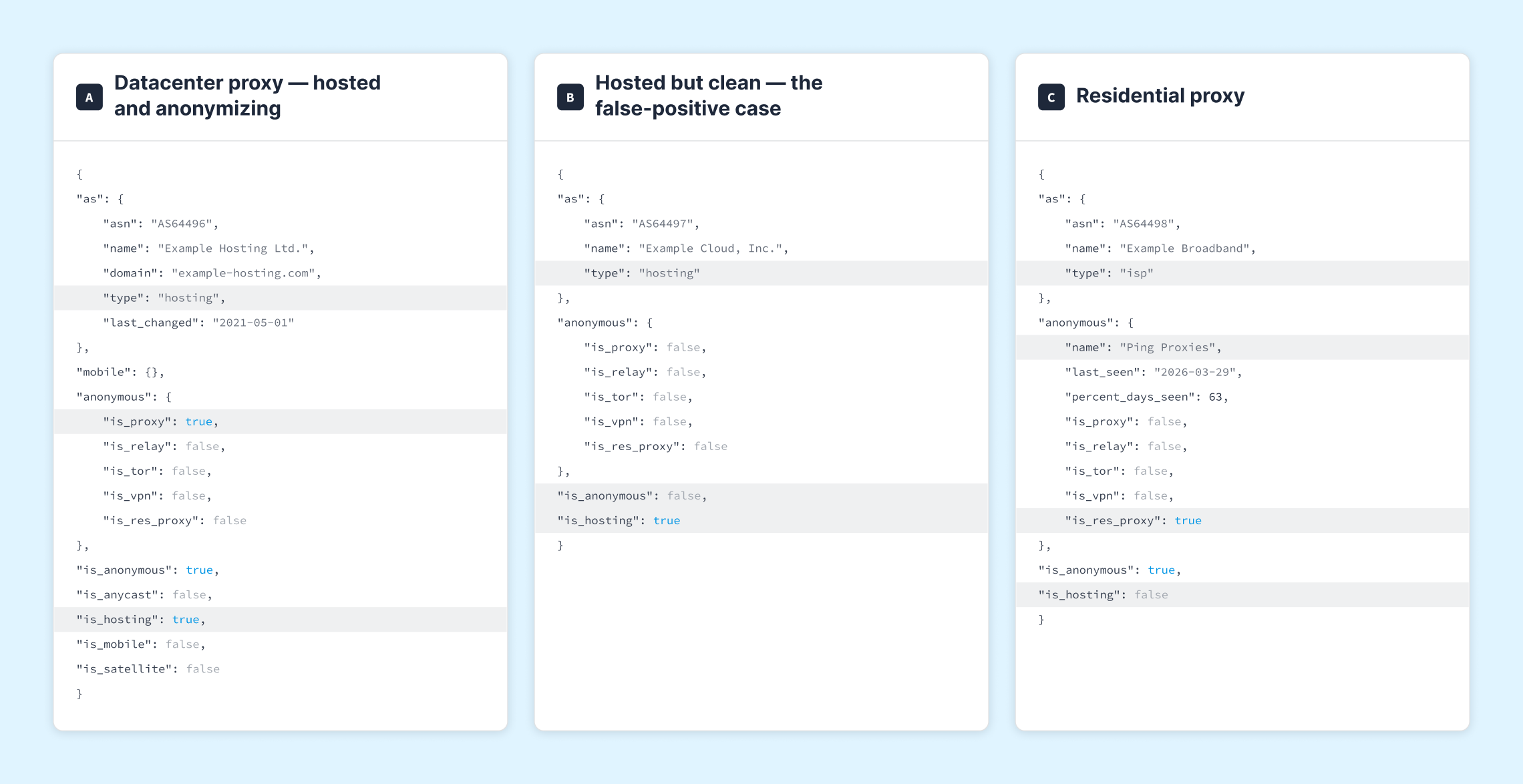
The first two responses share an important characteristic: both are announced by a hosting ASN and return is_hosting: true. Only the first, however, also returns is_proxy: true. That distinction separates commercial hosting infrastructure from an address that's actively identified as an anonymizer. Acting on the hosting flag alone would also catch the second IP, even though it's simply a cloud-hosted service rather than a proxy.
The third response shows why network ownership can't identify every type of proxy. Here, is_hosting is false and as.type is isp, so the network itself looks residential. The proxy signal comes from is_res_proxy: true, which indicates that the IP has been observed operating in a residential proxy network. The accompanying last_seen and percent_days_seen fields show how recently and consistently that activity has been observed.
That evidence doesn't come from network ownership or hosting classification. Residential proxy detection therefore relies on a separate dataset built through ongoing observation of residential proxy networks.
Those signals can then be incorporated into fraud detection, access control, bot mitigation, or security workflows alongside other network and behavioral indicators.
If you're implementing datacenter proxy detection, IPinfo's Proxy & VPN Detection provides continuously updated hosting, ASN, and anonymizer intelligence via both real-time API lookups and downloadable databases for applications and security pipelines.
FAQs
How do you tell if an IP is a datacenter proxy? Start with network ownership: look up the ASN and check whether it belongs to a hosting or cloud provider rather than a consumer ISP. Corroborate with reverse DNS and the address block's history, then confirm against anonymizer data showing whether that specific IP is operating as a proxy exit. Ownership alone tells you the traffic is hosted, not that it's a proxy.
Are datacenter proxies easier to detect than residential proxies? Yes. Datacenter proxies sit on networks whose ownership is public and structurally difficult to disguise. Residential proxies route through addresses assigned to real end users, so they carry none of those hosting fingerprints and require a purpose-built dataset to catch.
Can datacenter proxies be blocked? They can, but blocking every hosting IP outright will also block legitimate server-to-server traffic, corporate cloud egress, and crawlers. Most teams score hosting as a risk signal and reserve hard blocks for addresses positively identified as anonymizers.
What is the difference between a datacenter proxy and a hosting IP? A datacenter proxy is a hosting IP, but most hosting IPs aren't proxies. A hosting IP is any address on commercial server infrastructure. It becomes a datacenter proxy only when it's being used to relay someone else's traffic, which is a separate determination requiring separate evidence.
Why do some datacenter proxies still get through? Usually because the classification data is behind the infrastructure. Freshly allocated or reassigned cloud ranges can be in use before they're classified, and ISP proxies deliberately sit in the gap between hosting and residential networks. Continuously updated data narrows the window; nothing closes it entirely.
Share this article


About the author

Meghan is the content strategist at IPinfo, where she develops and writes content for users to better understand the value of IP data and IPinfo products.